# spank
Slap your MacBook, it yells back.
> "this is the most amazing thing i've ever seen" — [@kenwheeler](https://x.com/kenwheeler)
> "I just ran sexy mode with my wife sitting next to me...We died laughing" — [@duncanthedev](https://x.com/duncanthedev)
> "peak engineering" — [@tylertaewook](https://x.com/tylertaewook)
Uses the Apple Silicon accelerometer (Bosch BMI286 IMU via IOKit HID) to detect physical hits on your laptop and plays audio responses. Single binary, no dependencies.
## Requirements
- macOS on Apple Silicon (M2+)
- `sudo` (for IOKit HID accelerometer access)
## Install
Download from the [latest release](https://github.com/taigrr/spank/releases/latest).
Or build from source:
```bash
go install github.com/taigrr/spank@latest
```
## Usage
```bash
# Normal mode — says "ow!" when slapped
sudo spank
# Sexy mode — escalating responses based on slap frequency
sudo spank --sexy
# Halo mode — plays Halo death sounds when slapped
sudo spank --halo
# Custom mode — plays your own MP3 files from a directory
sudo spank --custom /path/to/mp3s
# Adjust sensitivity with amplitude threshold (lower = more sensitive)
sudo spank --min-amplitude 0.1 # more sensitive
sudo spank --min-amplitude 0.25 # less sensitive
sudo spank --sexy --min-amplitude 0.2
```
### Modes
**Pain mode** (default): Randomly plays from 10 pain/protest audio clips when a slap is detected.
**Sexy mode** (`--sexy`): Tracks slaps within a rolling 5-minute window. The more you slap, the more intense the audio response. 60 levels of escalation.
**Halo mode** (`--halo`): Randomly plays from death sound effects from the Halo video game series when a slap is detected.
**Custom mode** (`--custom`): Randomly plays MP3 files from a custom directory you specify.
### Sensitivity
Control detection sensitivity with `--min-amplitude` (default: 0.3):
- Lower values (e.g., 0.05-0.10): Very sensitive, detects light taps
- Medium values (e.g., 0.15-0.30): Balanced sensitivity
- Higher values (e.g., 0.30-0.50): Only strong impacts trigger sounds
The value represents the minimum acceleration amplitude (in g-force) required to trigger a sound.
## Running as a Service
To have spank start automatically at boot, create a launchd plist. Pick your mode:
Pain mode (default)
```bash
sudo tee /Library/LaunchDaemons/com.taigrr.spank.plist > /dev/null << 'EOF'
Label
com.taigrr.spank
ProgramArguments
/usr/local/bin/spank
RunAtLoad
KeepAlive
StandardOutPath
/tmp/spank.log
StandardErrorPath
/tmp/spank.err
EOF
```
Sexy mode
```bash
sudo tee /Library/LaunchDaemons/com.taigrr.spank.plist > /dev/null << 'EOF'
Label
com.taigrr.spank
ProgramArguments
/usr/local/bin/spank
--sexy
RunAtLoad
KeepAlive
StandardOutPath
/tmp/spank.log
StandardErrorPath
/tmp/spank.err
EOF
```
Halo mode
```bash
sudo tee /Library/LaunchDaemons/com.taigrr.spank.plist > /dev/null << 'EOF'
Label
com.taigrr.spank
ProgramArguments
/usr/local/bin/spank
--halo
RunAtLoad
KeepAlive
StandardOutPath
/tmp/spank.log
StandardErrorPath
/tmp/spank.err
EOF
```
> **Note:** Update the path to `spank` if you installed it elsewhere (e.g. `~/go/bin/spank`).
Load and start the service:
```bash
sudo launchctl load /Library/LaunchDaemons/com.taigrr.spank.plist
```
Since the plist lives in `/Library/LaunchDaemons` and no `UserName` key is set, launchd runs it as root — no `sudo` needed.
To stop or unload:
```bash
sudo launchctl unload /Library/LaunchDaemons/com.taigrr.spank.plist
```
## How it works
1. Reads raw accelerometer data directly via IOKit HID (Apple SPU sensor)
2. Runs vibration detection (STA/LTA, CUSUM, kurtosis, peak/MAD)
3. When a significant impact is detected, plays an embedded MP3 response
4. 750ms cooldown between responses to prevent rapid-fire
## Star History
[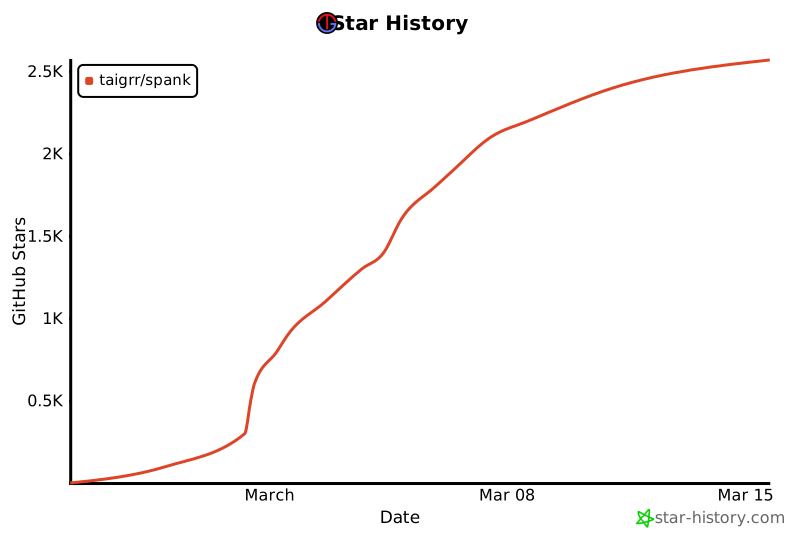](https://www.star-history.com/#taigrr/spank&type=date&legend=top-left)
## Credits
Sensor reading and vibration detection ported from [olvvier/apple-silicon-accelerometer](https://github.com/olvvier/apple-silicon-accelerometer).
## License
MIT